
Introduction
In the rapidly evolving world of software development, the ability to create intuitive and responsive applications is crucial. Data-driven decision-making is increasingly being facilitated by tools that make data visualization straightforward and engaging. Among these tools, Streamlit has emerged as a popular choice for building interactive web applications for data science projects. Coupled with Docker, a platform that consolidates code and its dependencies for seamless deployment, developers can create, share, and run applications with unmatched efficiency and consistency. This article delves into the capabilities of Streamlit and Docker, exploring how they work together to streamline web app development and enhance productivity.
Understanding Streamlit
What is Streamlit?
Streamlit is an open-source Python library that enables developers to create web applications for machine learning and data science projects with minimal effort. By allowing you to transform data scripts into shareable web apps with just a few lines of code, Streamlit eliminates the need for extensive front-end programming knowledge. It is built on Python, which is widely used in data science, making it accessible to analysts and engineers who may not have deep web development backgrounds.
Key Features of Streamlit
- Simplicity: Streamlit’s straightforward API and intuitive syntax allow developers to share their data analyses quickly.
- Reactiveness: Streamlit apps are reactive, meaning they automatically update when user inputs change. This interactivity is crucial for building responsive applications.
- Rapid Development: With Streamlit, developers can prototype applications in hours rather than days, enabling faster feedback loops.
- Rich Visualizations: Streamlit supports various visualization libraries, allowing developers to create impressive graphical representations of their data without extra setup.
Use Cases for Streamlit
Streamlit is ideal for:
- Data visualization dashboards
- Interactive reports and exploratory data analysis tools
- Machine learning model demos
- Data applications with real-time inputs
Understanding Docker
What is Docker?
Docker is a platform that utilizes containerization technology to simplify the process of building, shipping, and running applications in any environment. With Docker, developers can package an application along with its dependencies, ensuring it runs seamlessly on any system, thus overcoming the “works on my machine” syndrome.
Key Features of Docker
- Containers: Docker containers encapsulate an application and its environment, making them lightweight and portable.
- Version Control and Collaboration: Docker allows developers to version their application environments, making it easier to share and collaborate on projects.
- Ecosystem: The Docker Hub provides a rich repository of pre-built images, enabling developers to use existing applications and frameworks as a base for their projects.
- Isolation: Containers run in their environments, isolating applications and preventing conflicts between different software versions.
Use Cases for Docker
Docker is commonly utilized for:
- Microservices architecture
- Continuous integration and deployment (CI/CD) pipelines
- Environment replication for development and production
- Application scaling
Combining Streamlit and Docker
Seamless Deployment of Streamlit Applications
When combined, Streamlit and Docker form a powerful duo that enhances the development workflow for data applications. Developers can:
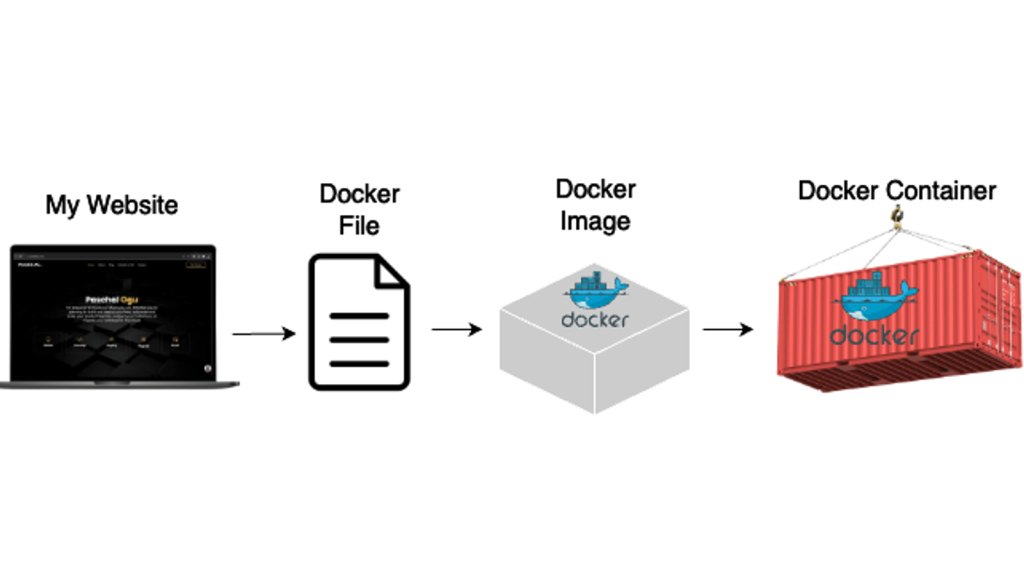
- Containerize Streamlit Apps: By creating a Docker image that encapsulates a Streamlit application, developers can ensure that all dependencies are included and correctly configured. This containerization facilitates deployment on various environments, such as cloud platforms or local servers.
- Simplified Distribution: Once the application is containerized, sharing it with others becomes straightforward. The receiver only needs Docker installed to run the application without worrying about modifying their environment.
- Environment Consistency: Deploying a Streamlit app using Docker guarantees that it will work on any machine, eliminating compatibility issues tied to missing libraries or differing software versions.
A Step-by-Step Overview of the Development Process
- Developing the Streamlit Application:
Start by building the Streamlit application using Python. Streamlit provides an intuitive interface that allows developers to focus on building features without concern for web design. - Creating the Dockerfile:
Write a Dockerfile that defines how to build the Docker image for your Streamlit app. The Dockerfile specifies the base image, installs dependencies, and specifies how the app will run. - Building the Docker Image:
Use Docker commands to build your application into an image that includes all necessary components. - Running the Container:
Run the Docker container, and the Streamlit app becomes accessible from a web browser, making it easy to test and use. - Sharing the Docker Image:
Push the Docker image to a repository, such as Docker Hub, for easy access and deployment on any machine.
Conclusion
The combination of Streamlit and Docker presents a compelling solution for developers seeking to create scalable, interactive web applications for data science and machine learning. Streamlit streamlines the development of engaging data applications with its user-friendly interface, while Docker ensures that these applications can be deployed consistently across various environments.
By leveraging both tools, developers can enhance productivity, simplify the sharing of applications, and ensure their work is accessible to a broader audience. As the demand for data-driven applications continues to rise, mastering Streamlit and Docker will be invaluable for developers looking to stay at the forefront of technology.
Implementing these technologies not only accelerates the application development process but also enriches the experience of end-users through interactive and dynamic web applications. As you embark on creating your next data application, consider the synergy between Streamlit and Docker to streamline your workflow and enhance your project’s reach.